
knitout-js cheatsheet
For the material programming project workshops, we have made an adapted version of CMU’s original Knitout visualiser, that allows you to write javascript code and export directly to files that run on the Kniterate machine. The visualiser uses a Javascript library called knitout, which allows you to write code that can be translated to run on a knitting machine.
knitout-js commands
This table is adapted from the longer guide in the knitout-frontend-js repository, and contains just the most important operations. The links go to the info pages on Gabrielle Ohlson’s knit.work website, which also has some really helpful animations.
| command | arguments | example | description |
|---|---|---|---|
| knit | direction, bed+needle, carrier |
knit("+","f10","3") |
Knit a stitch, on bed at needle, in direction, using carrier |
| tuck | direction, bed+needle, carrier |
tuck("+","f10","3") |
Tuck a stitch, on bed at needle, in direction, using carrier |
| xfer | from bed+needle, to bed+needle |
xfer("f10","b10") |
Transfer loops from from bed at needle to to bed at needle |
| rack | rack value(Number) |
rack(1) |
Translate the back bed relative to the front bed by rack value needle units. The default racking is zero – Kniterate machines also support racking by 0.5 (needed to knit with both beds) |
| drop | bed+needle |
drop("f10") |
Drop loops from bed+needle (if you can’t be bothered to cast off) |
| in | carrier |
in("5") |
Bring in yarn carrier carrier |
| out | carrier |
out("6") |
Take out yarn carrier carrier (not strictly necessary on kniterate and can cause issues – only do this right at the end) |
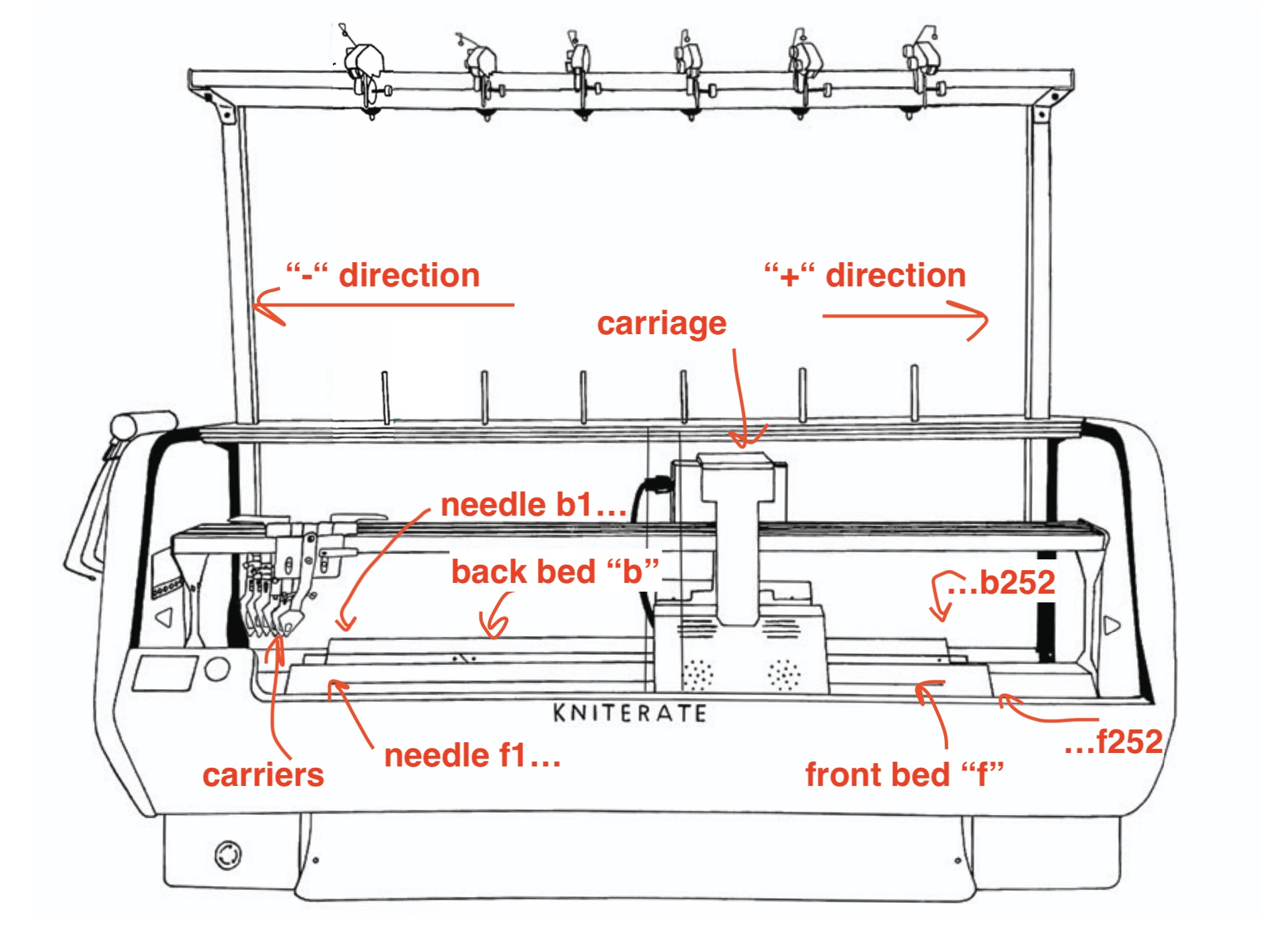
Here’s how the beds, needle numbers and carriage directions correspond to the knitting machine. Note that needles with the same ‘number’ will be opposite one another, and the positive and negative directions are the same for both beds.
kniterate-specific rules
- carriers on the Kniterate are numbered “1” to “6” – you can’t have other numbers
- you should rack by either a whole number, or by 0.5
- don’t put more than two tuck stitches on top of each other (machine will get stressed out – this is a general machine thing)
- don’t start at needle zero! try and center your design on the bed try 50 to start with
filetype guide
Using the visualiser allows you to write Javascript, which is transformed into KCode that runs on the knitting machine. It does this by first translating the Javascript into another language called Knitout, in which each line is a single instruction to the machine. Javascript is easier to read than Knitout, which is easier again to read than KCode.
| file type | ending | usage |
|---|---|---|
| kcode | .kc | the file that the kniterate machine runs. Needs to be called ‘command.kc’ in the |
| javascript | .js | code that’s written or loaded into the editor that creates knitting files, based on the knitout library. |
| knitout | .k | this is the file that translates between the javascript code and the kcode that runs on the kniterate |