
kniterate notes 6
This is the sixth in a series of blog posts about the Material Programming Project. We are developing malleable knitting software for the Kniterate, a semi-industrial knitting machine. This post is about some really exciting experiments adapting knit software to work in an experimental collaboration tool. The first post, on the Knitout project, is available here.
We had the final kniterate programming workshop of the term yesterday, which was a nice way to finish off the series. Chee and Mimi from Ink and Switch joined, and we also spent a while together experimenting with adapting the forked Knitout Visualiser into their new tool Patchwork.
Async JS in the Live Visualiser
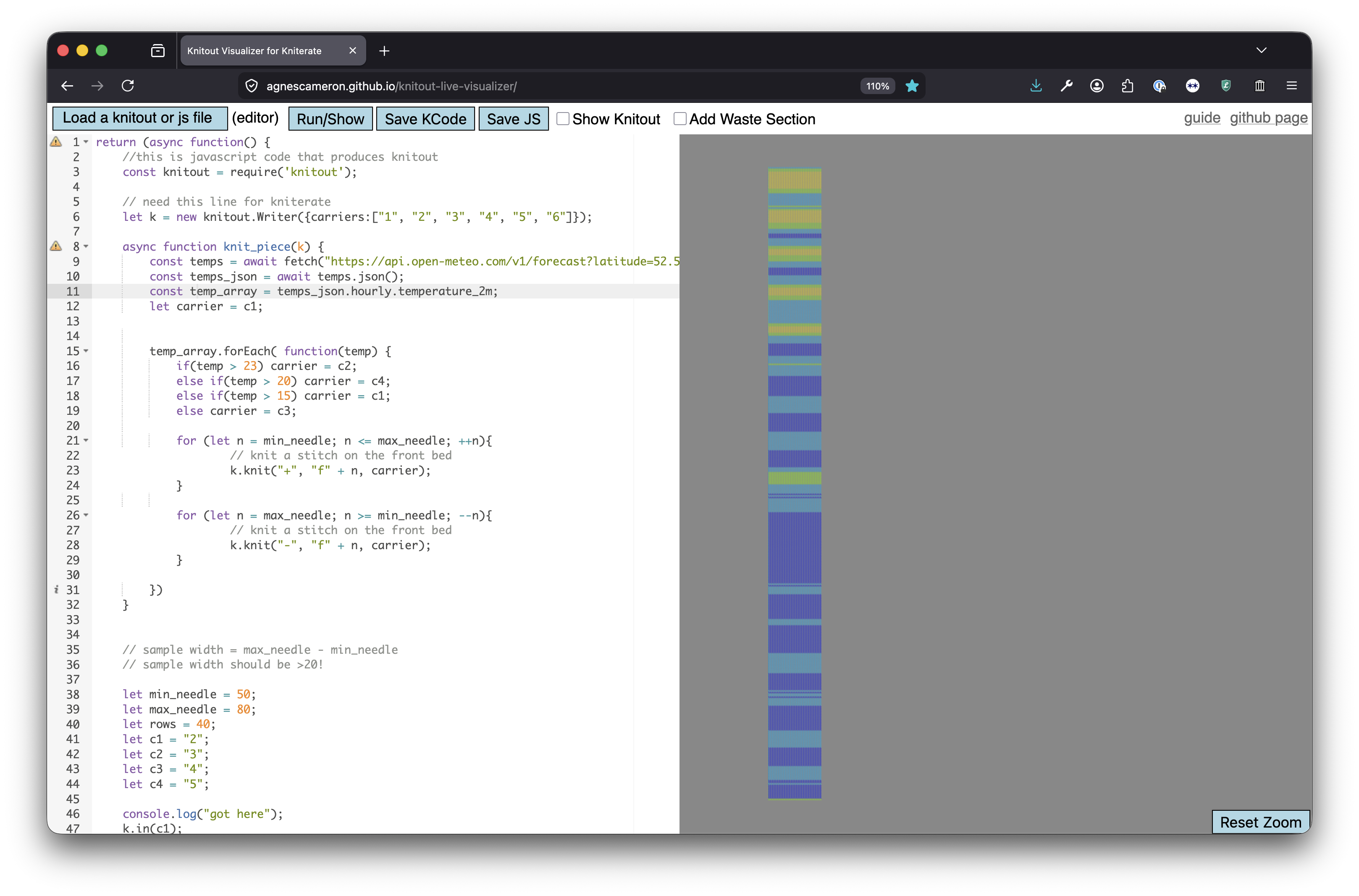
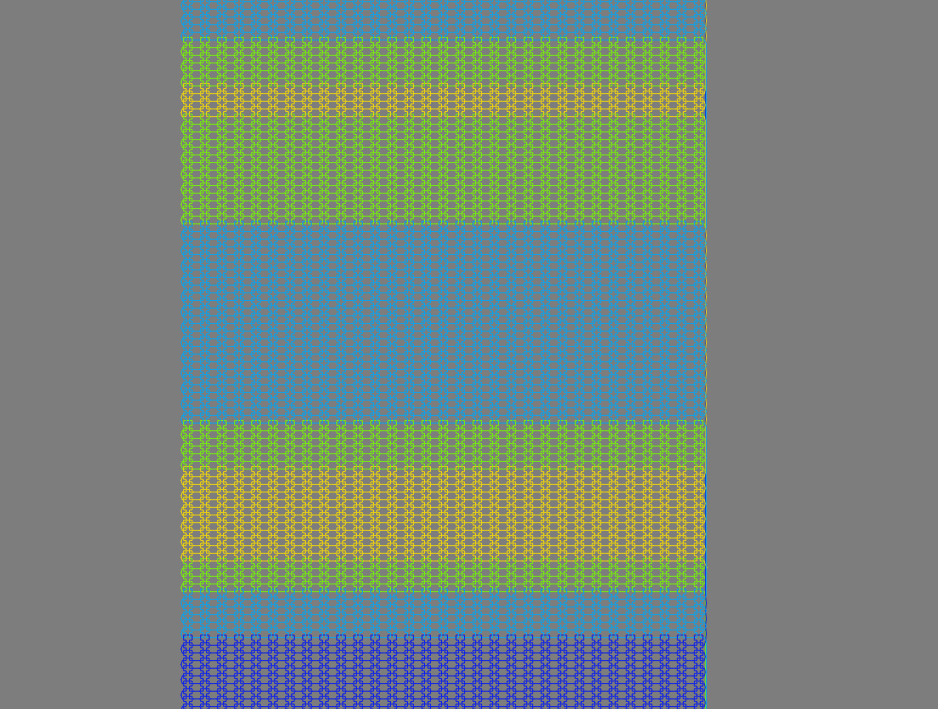 making a scarf about the weather
One change I made a few weeks back to the knitout visualiser was to adapt it to accept asynchronous JS. This was a small change in terms of the code, but makes a big difference pedagogically. After all, so much of the point of using code is being able to do things programatically with information, and being able to fluently get information in and out of a program feels like a really obvious way to demonstrate why this might be a cool line of inquiry.
The students who came to the workshop were really interested in this part, and I think it helped the editor come alive a bit. In this session, we just had CCI students (the Chelsea students had just put up their degree show and were understandably pretty exhausted), and also had some great suggestions for ways to improve the tool further (like adding CSV import).
As a demo, I made a scarf based on the past 10 and next 7 days’ (atrocious!) weather in London, with each 2 rows representing the hourly temperature. This was extremely simple as a data vis task, but was nonetheless incredibly satisfying to be able to scroll up and down and see the night-times in dark blue and the cold parts and imagine wearing a scarf in the weather that also described the weather. The niceness of this made me feel really optimistic, and also that I think if we’re to run these next year (I hope we do!) then it’ll be really important to collect a bunch of these examples to show everyone.
Predictably, this also threw up a few bugs with things like the waste section generation, but it felt so good to see the tool in use. We also sent around the Patchworked visualiser, and had everyone editing the same KnitoutJS file!
Patchworking Knitout
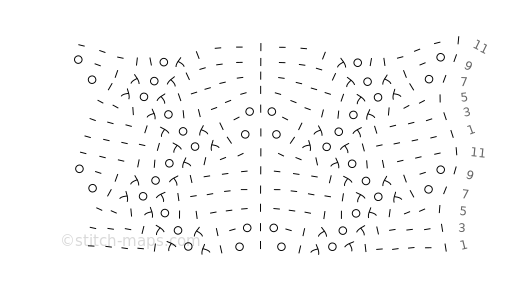 A pattern by Stitch Maps user enara, linked here.
Pre the afternoon workshop, we spent a long time discussing the ins and outs of putting the Knitout Visualiser into Patckwork, talking about the ideas of both projects in relation to one another. It was a really a nice experience to get to understand both of them better, and to have to rearticulate what it is we want the software we’re making to do.
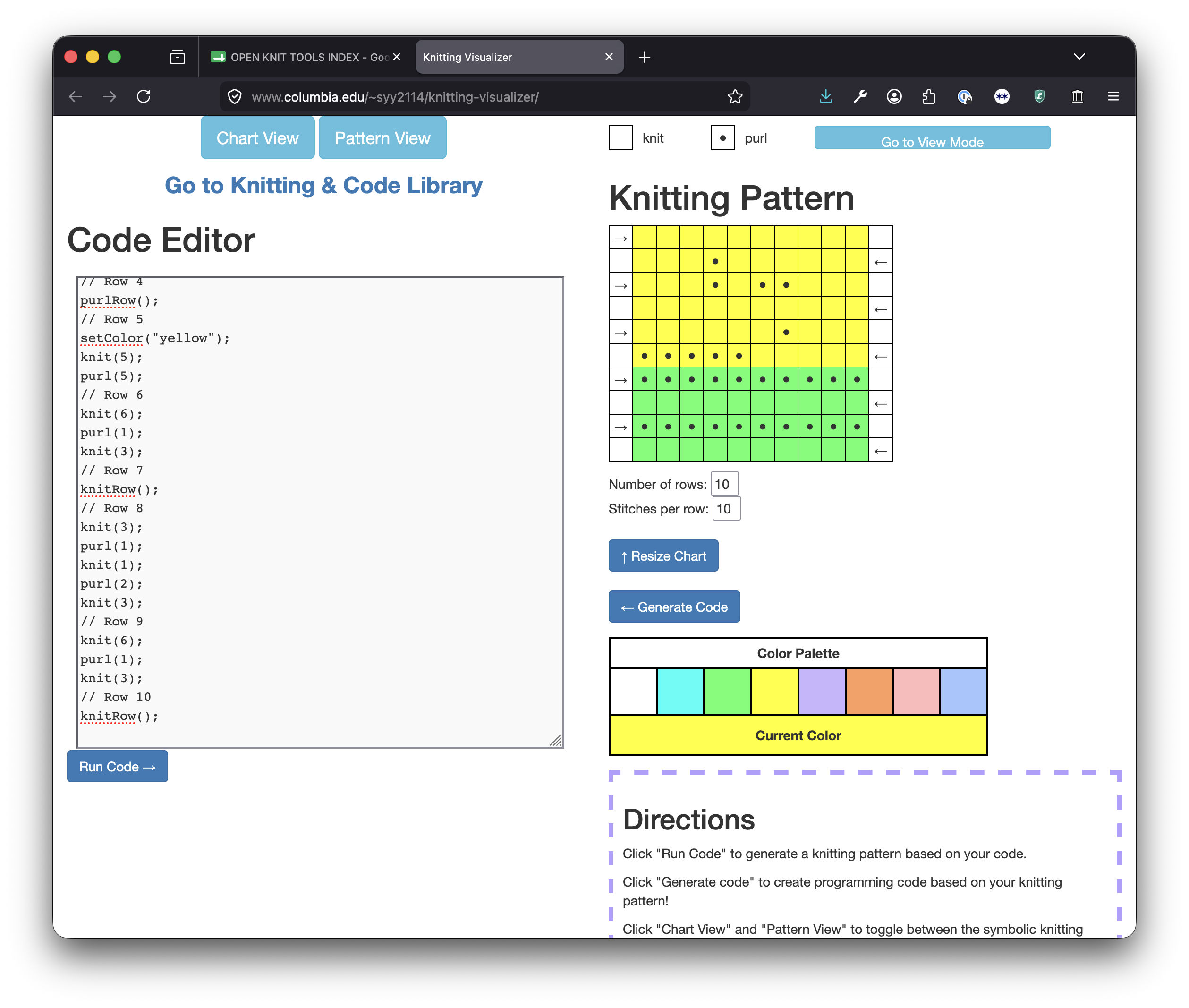 Stephanie Yang’s Knitting Visualiser tool in use
We spoke for a long time about a number of different knit tools. It was actually great to revisit these now – when we first made the Open Knitting Tools Index I knew so much less about knit, and it felt really good to have so much more language for what was interesting or not about different projects, through the lens of malleability and representational lenses.
In particular, we spent ages with the Stitch Maps project – there’s something really cool about having a symbolic language that communicates higher-level ideas like structure that felt like a really concise and beautiful form of abstraction of knit that’s very different to anything else I’ve seen.
We also came across a really lovely tool that uses JS code to generate hand knitting patterns by a game design lecturer at Columbia called Stephanie Yang, who also wrote a nice paper about the project. It had a really cool bidirectional code/pattern generation feature that I’d not seen before – Chee and Mimi thought it would be a cool thing to implement for the knitout visualiser.
Understanding Patchwork
While I’m still getting to grips with the finer details, my understanding of Patchwork is as follows:
an interface for collaborating on arbitrary file types (providing there’s some way to display them in a browser) that provides end users with a range of interpretive lenses with which to view the same file (and makes it convenient to make your own lens)
The first thing that Chee did to put the Knitout Visualiser into the interface is to make the underlying Automerge file the Knitout-JS code, and then to make both the editor interface and the visualiser pull from that base representation. Intuitively, I thought that the Knitoutfor more on Knitout, KnitoutJS and other file formats, see these notes code itself might make the most sense to be the underlying representation – but the issue with that is that it doesn’t encode how it was made – so you could use it to visualise the knit, but not to extract the code that generated it. This is quite interesting from an informational standpoint – the idea that despite its relative brevity, the JS code is actually much more expressive, though I suppose that with the repetition/redundancy of knitout this shouldn’t be so surprising.
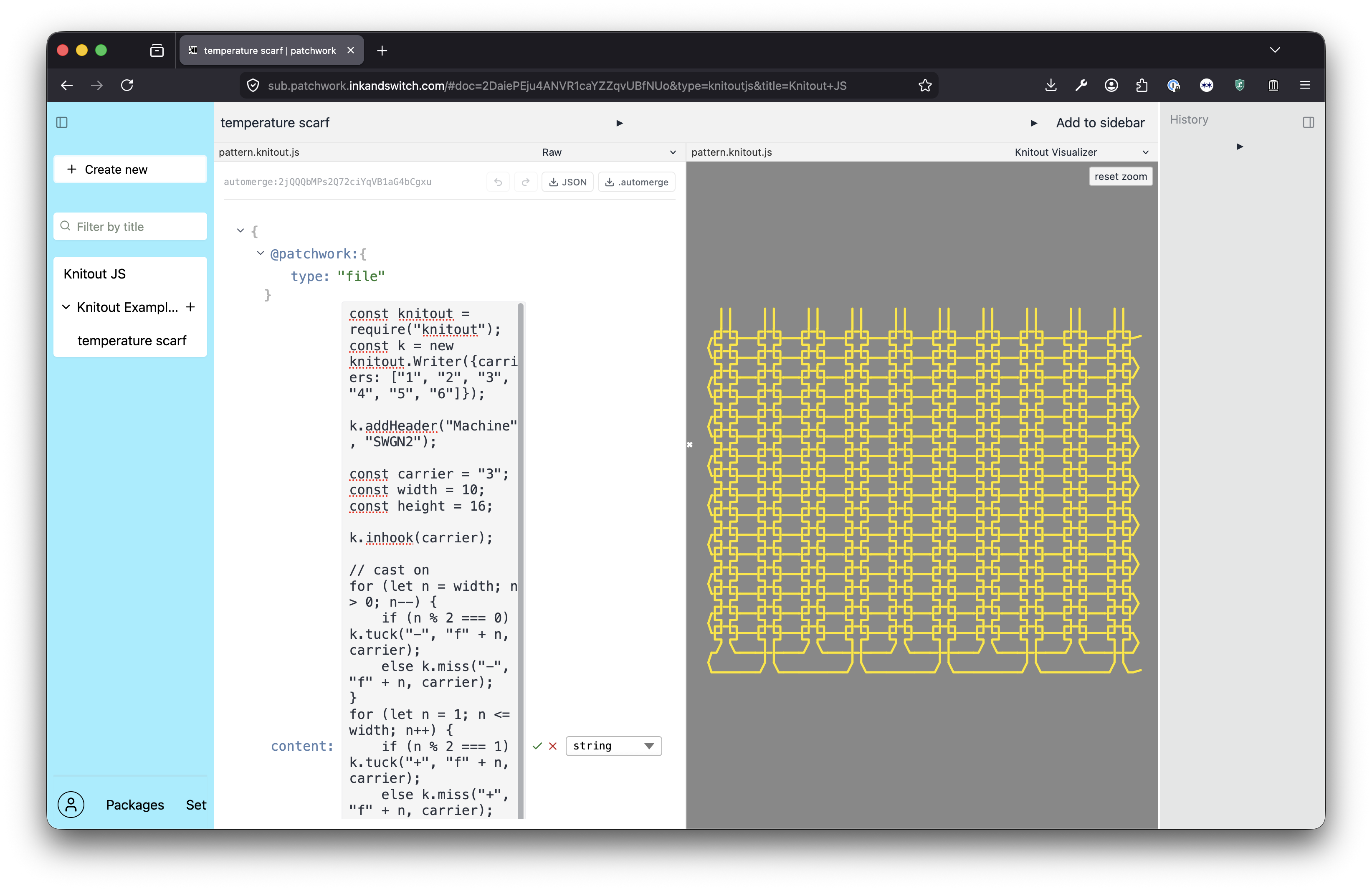 editing the kniterate editor in patchwork!
Some questions came to mind after the session:
- can you make the patchwork representation of the knitout visualiser track the changes I’m making to the browser based tool in my git repo? (I suppose this is a broader question of making things play or not with outside tools). Thinking about this more, I suppose it becomes a question of – can I have a lens on this which behaves like more of a pure client side demo for students, that’s currently functioning like the app I’m hosting on my github pages. It would be nice to be able to turn ‘on’ and ‘off’ collaboration on the file.
- kind of by accident (/ by using claude) the template file that Chee made as the default knitoutJS file template was for the Shima rather than the Kniterate. This is fine obviously but it got me thinking about templates and drivers, and how to specify what kind of file you want at the interface level (or whether you even want people to do that)
Further Patchwork Notes
I’ve been playing around a bit more with the system since Friday and am starting to get a feel for it. At the back of my mind when using it are Rob Pike’s papers Window Systems Should Be Transparent, and Help: A Minimalist Global User Interface. I first read them when I was doing a project with the Bell Labs archives back in 2020 and they left a real impression, particularly this sense about the relationship between applications and files, and how they should interact with one another. Consider this line about Help:
“A help window on such a file behaves much like a menu, but is really just a window on a plain file. The useful properties stem from the interpretation of the file applied by the rules of help; they are not inherent to the file.”
It’s subtle but it’s so cool. The application is a lens on a file, which is not owned by that application but instead is a participant in the system of processes taking place on the operating system. The file is there to inform the application, not the other way around!
There’s this really core subtext of the last 20 or so years of developments in computer interfaces, which has essentially degraded and deprioritised the importance of the human-generated stuff that computers are meant to be here to help us organise and develop, in favour of applications that bury and obscure the file-ness of operating systems. This is a design decision that I encounter regularly in my work with students baffled by the way their their computer operates.
Consider Cristobal Sciutto’s essay Abstraction Without Indirection, on working with LLMs to process legal videos (and always directing people back to material that’s human generated). Or discussions of the semantic web, and the move from the idea that a URI contains a link to a piece of information -> containing a link to an app.
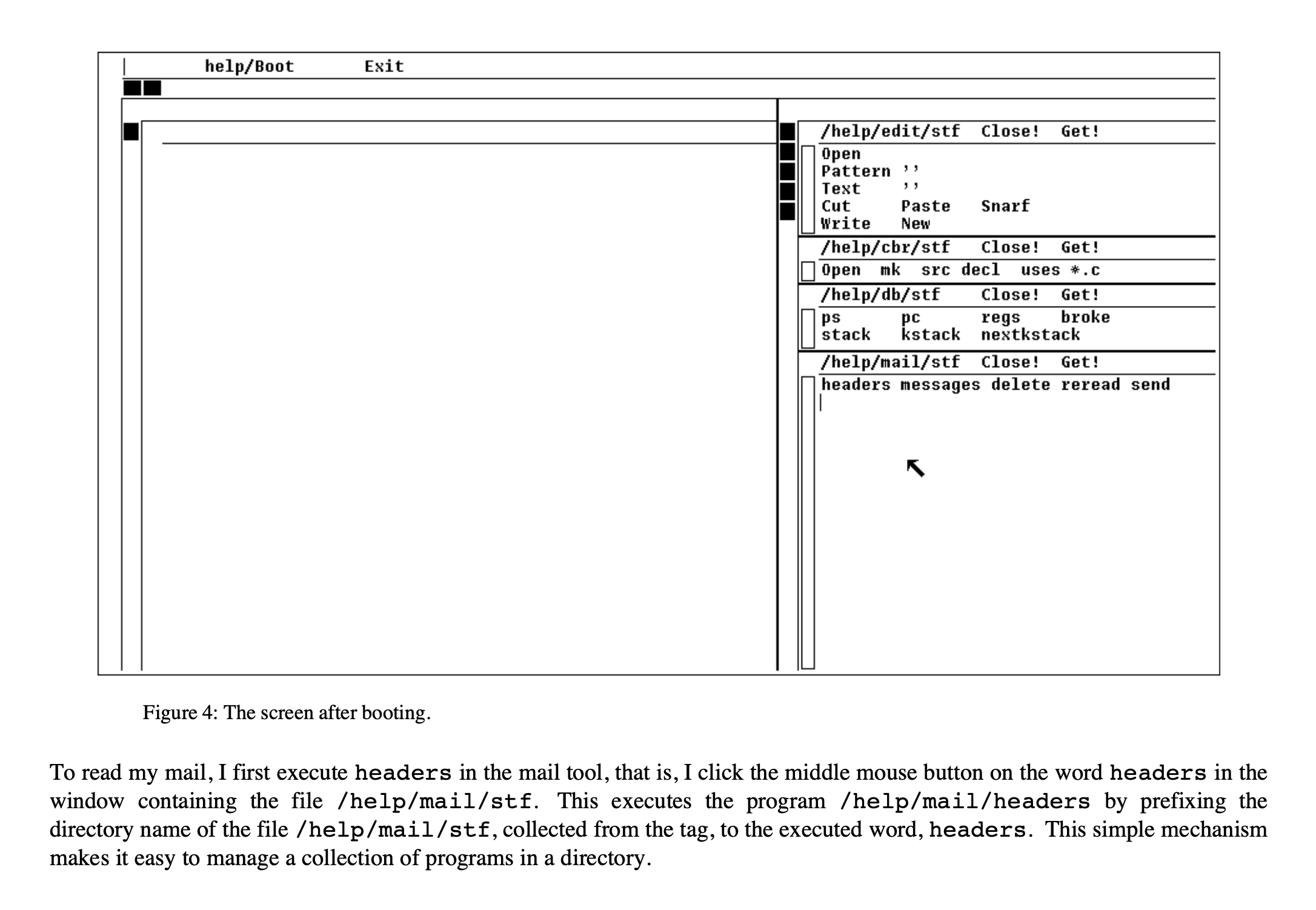 Rob Pike describing how to open emails in Help
The other cool thing about what Pike’s talking about (that also feels very present in patchwork) is editing a file that changes the behaviour of the operating system, and for that being as normal as, say, editing a file that has a shopping list in it. And like, yeah, I kind of do this all the time on my computer, but it actually feels super limited. Even customising my user space in Gnome on Arch (theoretically as free from constraint as one can be) is kind of a big pain (and yes yes of course I could be writing my own tiling window manager, but I haven’t!). I think it’s maybe because of assumptions we make about interfaces. There’s something cool about an interface which invites you in to rearrange it. Kat and I had a conversation the other week about computers feeling like houses vs malls, and the idea of being free to ‘mess up the rug’ being something that’s core to feeling like you’re in a domestic space that you have some ownership over.
Anyway during my first solo hour with Patchwork I managed to hide my sidebar and seemingly remove my ability to make knitout files in the first place, as well as learning how to edit the underlying file structures and having a really good time. The rug is kind of gross now and will need to call in a cleaning service on Monday morning, but I’m really pleased to be here.